
SEO Case Study: How I Ranked #1 on Google with Conversion-Focused Blog Writing

SEO is one of those things people love to overcomplicate.
Like, you hear “SEO” and instantly picture a tech-bro hunched over a laptop, drowning in spreadsheets and punching in weird mysterious internet codes all day.
(At least, that’s what I used to picture.)
But here’s the actual truth.
It’s not that complicated at all!
In fact, I got one of my blog posts to rank #1 on page 1 of Google in less than a week -even with a low domain authority and zero backlinks-.
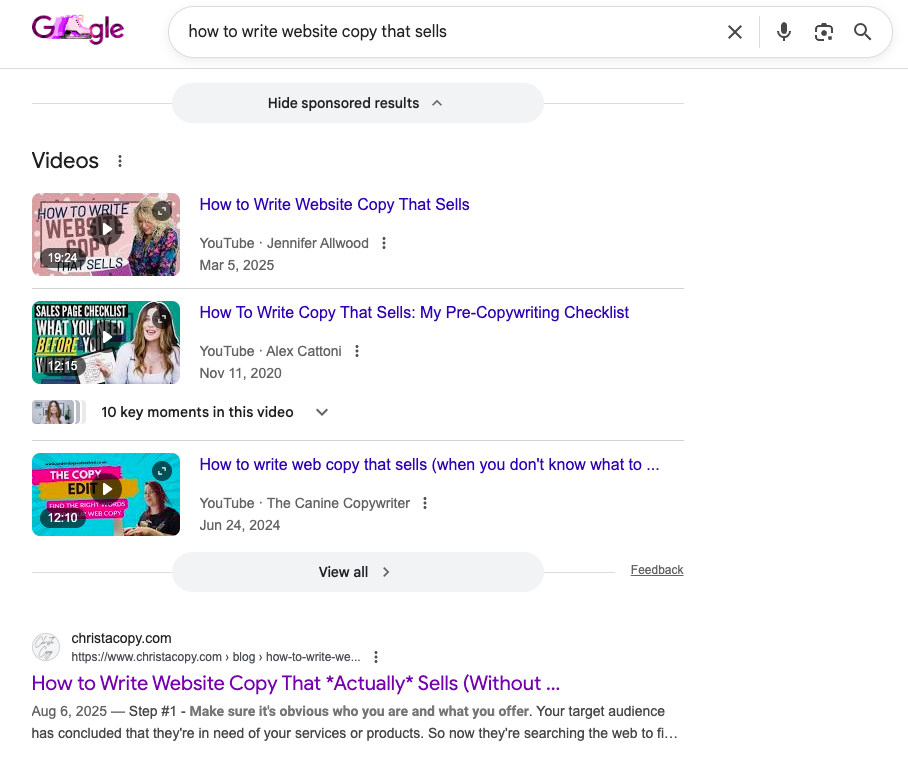
My blog post ranking #1 on Google
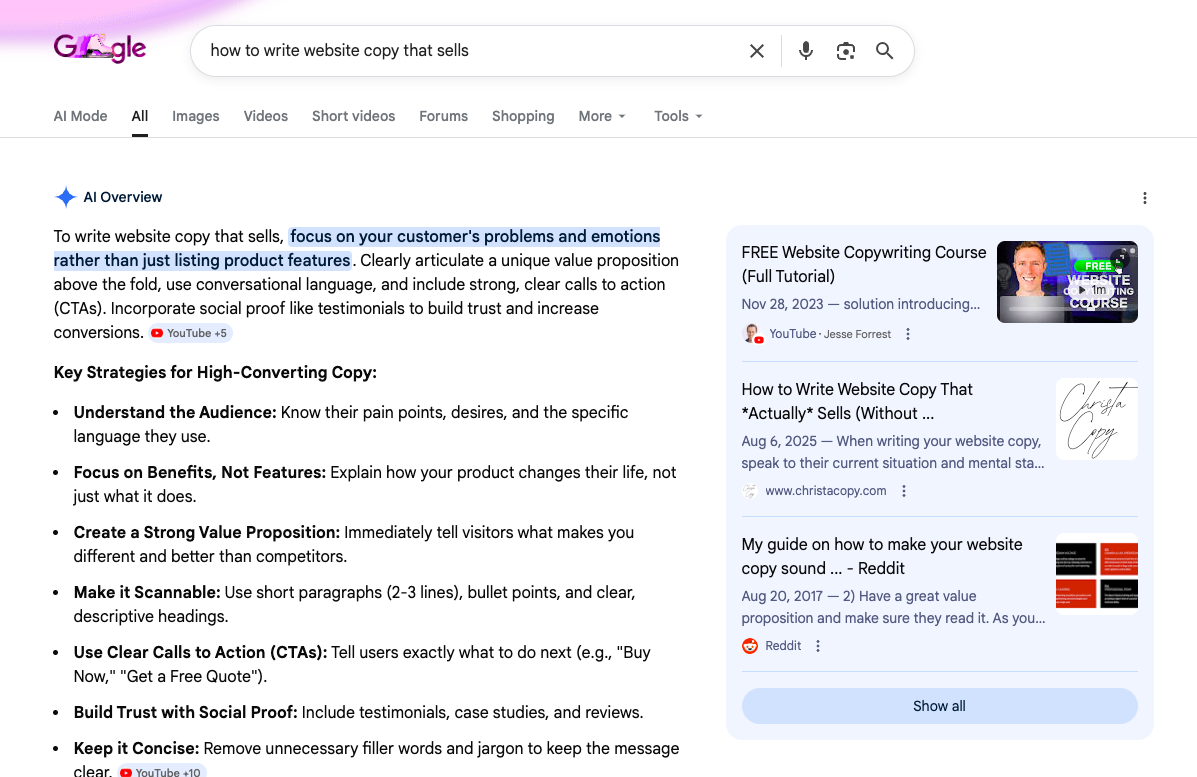
My blog post showing up in the AI overview.
And I didn’t do anything technical or complicated.
I simply wrote the post using a conversion-focused + personality-driven + SEO-friendly strategy that makes Google happy and keeps readers engaged.
In this post, I’m going to break down exactly what I did -step by step- so you can:
Understand why it worked.
Apply it to your own content.
And see how blog writing can help your website/business show up in front of the right people (without relying on ads).
Some quick context for you.
I’m a copywriter, and this is literally what I do for a living. I write conversational, compelling, SEO-friendly, copy/content that ranks and converts.
So, if you’ve ever wondered how to write blog posts that don’t just sit around collecting dust… but actually work towards growing your business and increasing your sales…
You’re exactly where you should be right now!
Now, let’s get into all the dirty details, shall we?
How I used SEO to get my blog post ranking #1 on Google:
Step 1 - I chose an SEO-keyword blog topic.
Before you ever start writing a blog post, you need to choose a topic people are already searching for… aka an SEO-keyword.
Since I’m a copywriter who specializes in website copy and blogging, I wanted this post to attract:
Small business owners
Entrepreneurs
Service providers
All of whom know the importance of having a website and care about writing website copy that actually converts.
So, the keyword I targeted was:
“How to write website copy that sells”
Then I turned that keyword into a title that felt more engaging, and personality-driven (with my unique brand voice).
“How to Write Website Copy That *Actually* Sells (Without Sounding ‘Salesy’)”
Because here’s the thing…
SEO isn’t just about using keywords; it’s about using keywords without sounding like a bland, generic robot.
Here’s how I personally find all my keywords.
I like to use KeySearch (my favorite SEO tool) to find keywords that have a:
High search volume
Low competition
However… if you don’t have an SEO tool, don’t panic!
Here’s exactly what I’d do to find keywords if I wasn’t using an SEO-tool:
Start typing your topic into Google.
Look at the autocomplete suggestions.
Check the “People also ask” section.
Scan the titles of page 1 results.
Those results tell you exactly what people are searching for and how your competition is framing the topic.
So, bottom line here, choose a keyword your audience is already searching for… then write a title that makes them want to click. Put your voice into it.
I actually use this exact method plus an SEO-tool to choose blog topics for small business owners who want to attract and win over their dream clients, not just get random clicks from dead end leads.
Step 2 – I wrote content that’s educational… but not boring.
Once I had my keyword and topic, I made sure the post delivered on exactly what my audience came for…
“How to write website copy that sells”
I even included real website copy examples, wrote samples for niches beyond my own, and showed the right way vs. the wrong way to do it.
Making it easy and hands on for someone to implement what they learned immediately.
But I didn’t write any of it like a stiff, generic, -keyword stuffed- SEO article.
I made it:
Story-driven.
Personality filled.
Relatable.
Easy to skim.
And actually enjoyable to read.
Because there’s no use in writing helpful content if your reader X’s out halfway through!
I’ll let you in on a little secret that most people miss…
Google doesn’t only care about keywords… it cares about content quality too.
Plus, it can tell when people are genuinely reading your post or simply bouncing around and leaving after 10 seconds.
So, instead of writing like a textbook, I wrote like I was talking to a real person (because, well, I am)!
Like a laid-back conversation where I want my reader to feel seen, nod along, and maybe even let out a chuckle or two.
Step 3 – I structured my post in a very specific way.
The next most important thing I did was make sure my blog topic was structured in a way that was easy for:
Google to understand.
And readers (my target audience) to actually read.
First, I used an H1 tag (heading 1) that included my keyword.
Your H1 tag is the first thing that Google and your readers see.
It tells them exactly what your article is all about.
Then I wrote an intro that hooked readers quickly.
Getting to the point while also making sure my intro:
Grabbed attention within the first few sentences.
Led into a relatable question that got my readers thinking.
Made it clear I would deliver on what they came here to learn.
You don’t want to ramble and add pointless ‘fluff’, but you also don’t want to start by diving into facts and sounding like a ‘how to’ manual.
I wanted my intro to be interesting, to keep my readers on their toes, without losing their attention by veering off too far or taking too long to arrive at the point.
I also kept my content skimmable and easy to read.
Here’s exactly how I did that:
I broke up every section with clear H2 subheadings.
I cut out big paragraphs, starting a new line every 1-2 sentences.
I used bullet points generously.
I ended each section with a short “quick takeaway” (1-2 sentences max).
Because Google doesn’t only rank good, helpful information.
It ranks content that’s easy to navigate, easy to understand, and actually keeps people reading.
Step 4 – I used my target keyword naturally (without keyword stuffing).
My keyword usage didn’t stop at my H1 blog topic.
I continued to use my target keyword naturally throughout my content… but I didn’t ‘keyword stuff’.
Because Google will not rank your article higher because you repeated your keyword a million times.
In fact quite the opposite.
That’s seen as spammy, and Google doesn’t like that. Plus it clearly doesn’t benefit your readers.
Here’s exactly where I included my main keyword (and a few supporting keyword variations):
In the first couple sentences of my intro.
Naturally throughout the body of my content.
In my conclusion section (H2 tag)
And again in the last few lines.
Quick note: Supporting keywords are natural variations of your main keyword (and they help Google understand your topic even more deeply).
You should also attempt to use your keyword in one or two other subheadings if possible (only if it’s not forced).
All of this helps Google clearly understand what your post is about.
Plus it helps your writing feel genuine and human -while showing you care to provide value-.
Step 5 – I scoped out my competition.
Here’s the truth… every blog topic has been done before.
So, I wanted to make sure my post would be even better than the ones written by my top-ranking competitors.
Here’s exactly what I did:
I Googled my target keyword (“how to write website copy that sells”).
I studied the top page one results (especially the #1 spot).
I noticed how they framed the topic and what angle they took.
I paid attention to their structure (H2 tags, sections, formatting, skimmability).
I looked at the key points they covered (and what they didn’t cover).
I checked whether they included real examples, templates, or proof.
I looked at what internal and external linked they used.
I even looked for gaps (things none of the top-ranking posts explained clearly enough) so I could fill them in.
Then I pulled up KeySearch again. I typed in my target keyword and viewed the SERP analysis to get even more insight on things like:
Their word count/post length.
Related keywords and variations that were used.
Common questions people asked around the topic.
Common headings and subtopics that were used.
This is the same research I would do when writing a blog article for a client as well.
Because all of this gave me a clear ‘map’ and understanding of what Google was already rewarding.
Not so I could copy anyone…
But so I could understand what was working, and then create something even more valuable, more engaging, more helpful (through my own voice and unique insight).
Step 6 – I made my post conversion-friendly (so it didn’t just rank, it sold).
This is something a lot of people seem to forget about.
They write a killer blog post, get it ranking… and then leave their readers with nowhere to go next.
Because truthfully, what good is a top-ranking blog post if it isn’t bringing you more clients and sales?
That’s why I made sure my post included a clear trail of CTAs (calls to action).
Not in a pushy way, just in way that made it obvious:
Who I am.
What I do.
And how I can help further.
Here’s what I did:
I used my own website copy as a real example (and linked to my homepage).
I mentioned my services in the ‘conclusion’ (linking to my service page).
I offered my free resource “How to write website copy that sell”.
I also ended my post with a short ‘about me’ section (with links to my homepage, services, and blog), which I include at the end of every article.
And lastly, I included a small section titled:
“If you liked this article, then you’ll love these too!”
Linking to 3 related blog posts.
Because the longer someone stays on your website, the more they:
Trust you.
Connect with you.
And eventually feel ready to take action.
Plus, this also helps with SEO, because Google pays attention to how long people stay on your website and how many pages they visit.
SEO case study results + timeline.
After writing, editing, and publishing my post, it didn’t hit the #1 spot overnight.
But it did climb to #1 on Google within just a few days.
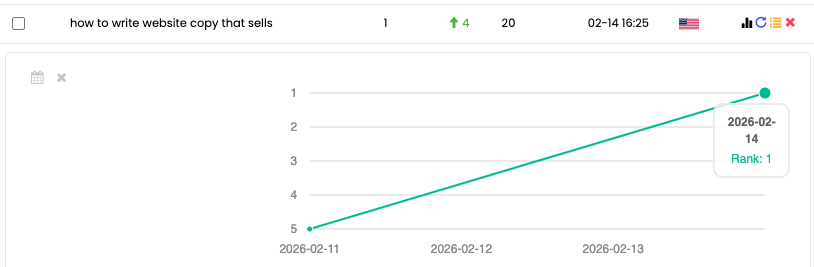
The KeySearch ‘rank tracker’ tool, showing how I went from ranking #5 to #1 in 4 days.
And honestly? I was shocked… but also not shocked.
Because I applied the exact strategy I use as a copywriter:
Conversion-focused writing that keeps people reading.
Educational content that actually answers the search.
SEO tactics that help Google understand what the post is about.
The same approach I’d use if I were writing a blog post for a client.
And the truth is, none of this is mysterious or overly complicated.
It’s simply a formula that works, because it’s built around one thing:
Giving your readers exactly what they came to Google for!
Enough to leave them feeling clear, confident, and satisfied.
I will admit though…
The fact that my article ranked to #1 so quickly -even with a low domain authority and zero backlinks- surprised me (in the best way).
Because typically, that makes it much harder to break onto page 1 at all.
So, clearly, Google saw something it really liked.
Something I’ll continue to do for every blog post I write, for my own site and for my clients.
Because it just works!
SEO Case Study: How I Ranked #1 on Google with Conversion-Focused Blog Writing ‘Conclusion’.
Alright friend, I want to leave you with this.
There is a method when it comes to writing blog post that rank on page one (and even hit #1).
Simply winging it and “writing good” content isn’t always enough.
But the good news? It’s not as complex or intimidating as people make it seem.
It all comes down to:
Targeting the right keyword.
Using it naturally throughout your content (without keyword stuffing).
Keeping your content skimmable and easy to read.
Combining engaging + educational writing.
Delivering the exact information your reader came for.
And leaving a clear trail of CTAs to follow.
That’s the method.
Simple… but important.
Because remember, blogging is still one of the best ways to grow your business and attract clients (even in 2026).
So, let’s make sure your blog posts aren’t collecting dust on page 100 of Google!
Well, that’s all she wrote friend.
And I truly hope this SEO case study gave you the clarity you need to start getting your own blog post ranking higher on Google.
Also, go ahead and check out my post “how to write website copy that actually sells” that’s ranking #1.
Read through it so you can get a real feel and example of everything I did and talked about in this post.
Want even more help?
If you’d like someone to write conversion-focused, SEO-friendly blog posts for you (ones that sound like you and attract your dream clients), I’d love to help!
→ Check out my blog writing services!
Or maybe you’re more of a DIY kind of person.
If that’s the case… grab my freebies below!
Keep them both handy for the next time you sit down to tackle your blog post.
So you can make sure each one you write is set up for success!
Did you find this post helpful? Well you’re going to love these then!



Hi, I'm Christa! A freelance website copywriter who helps creatives and small business owners write SEO-friendly website copy that feels like you and sells without sounding ‘salesy’.
So, if you’re ready to attract your dream clients and make more sales, I’d love to be your copywriting companion!
✨ Check out my website - Get to know even more about me and my offer.
✨ Snoop my services - I specialize in writing copy for websites and content for blogs. But I'm always open to client requests as well.
✨ Browse my blog - Dive into topics like SEO, copywriting, blogging, and more.